Loom video to text

Transcribe a Loom Video in Seconds

Download the video from Loom and drop the MP4 here, or paste a public link to the video file. You get an editable transcript, SRT and VTT captions and a one-click summary in seconds, free in V4-Flash with no daily limit.

Blazing Speed. Incredible Accuracy.

Upload your Loom recording and get a transcript in seconds.

Cockatoo delivers accuracy you can verify, at up to 120x real-time.

  • Unlimited free transcripts
  • MP4 and every common video format
  • SRT and VTT captions
  • 36 languages
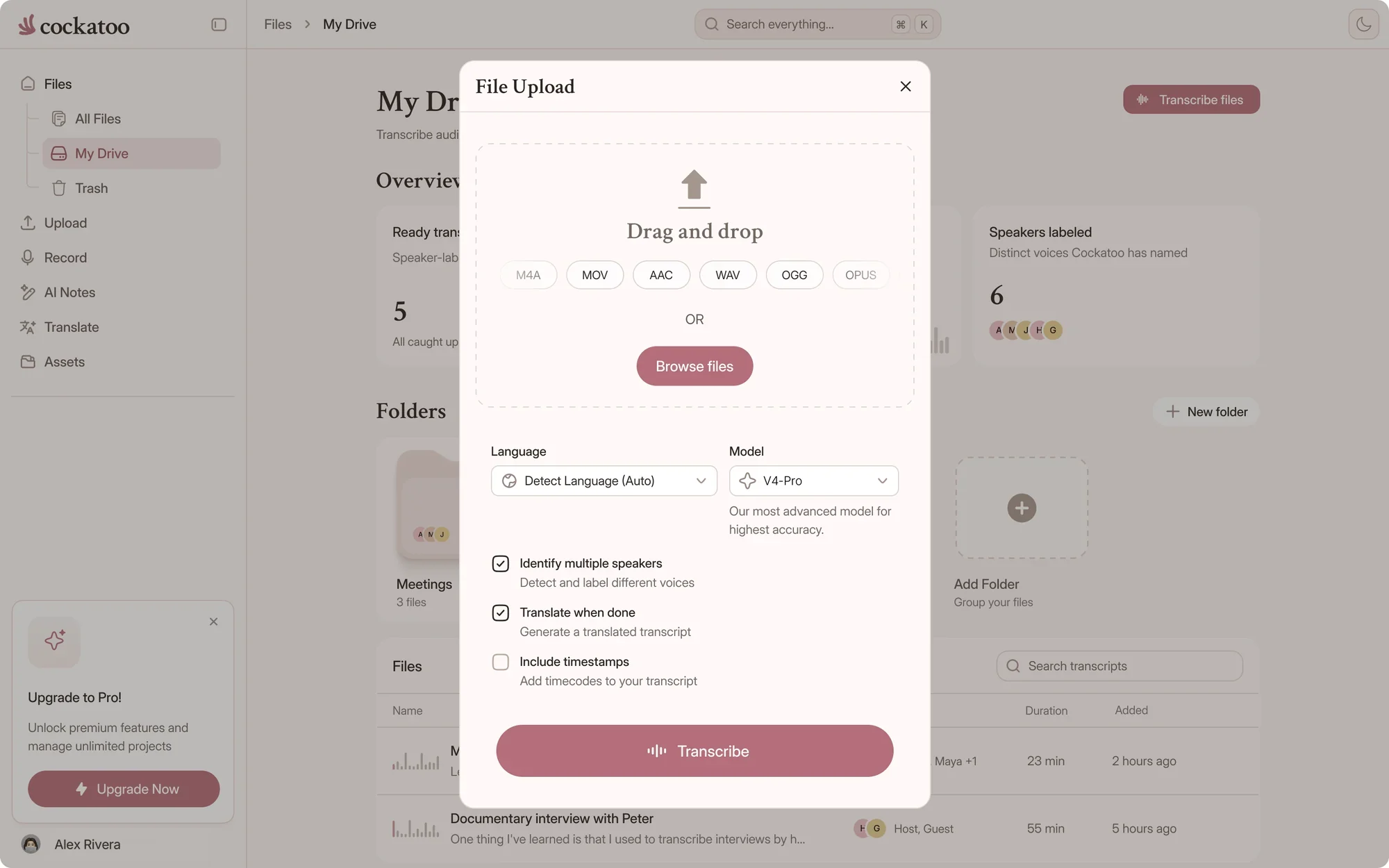
Cockatoo upload dialog with transcription options
Drag and drop
MP3MP4M4AMOVAACWAVOGGOPUSMPEGWMV
OR
In short

Quick Answer

Upload Loom Video, Get Editable Transcript with Speaker Labels and Timestamps

Download your Loom video and upload the file, or paste a public link to the video file. Cockatoo identifies each speaker, adds word-level timestamps, and delivers a transcript you can edit in your browser.

No waiting for an email. Your transcript is ready in seconds, synced to the video as it plays.
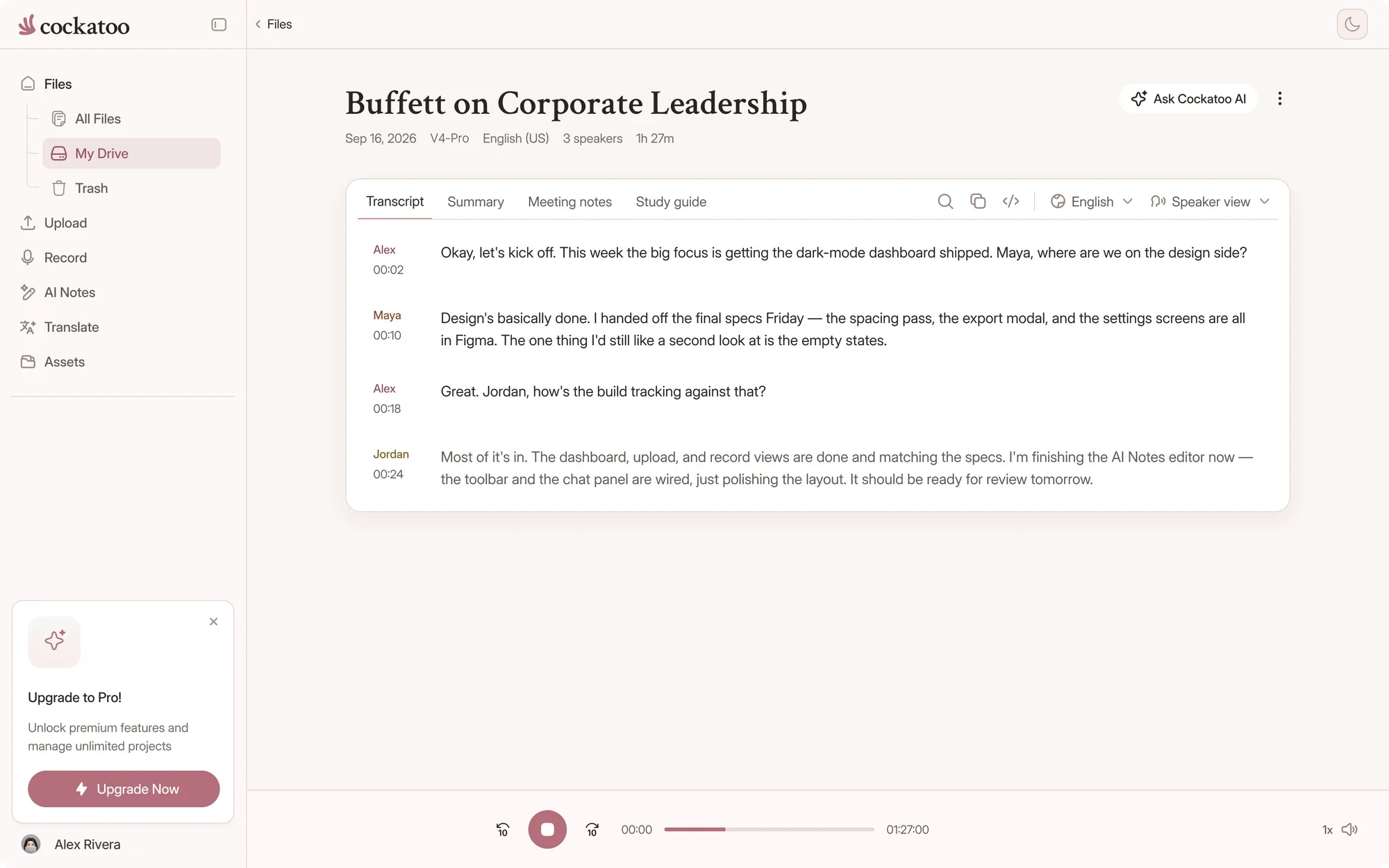
Cockatoo transcript following along as the recording plays
What you get

What You Get When You Transcribe Your Loom Video with Cockatoo

One upload turns a screen recording into captions, searchable text and a summary your team can skim.

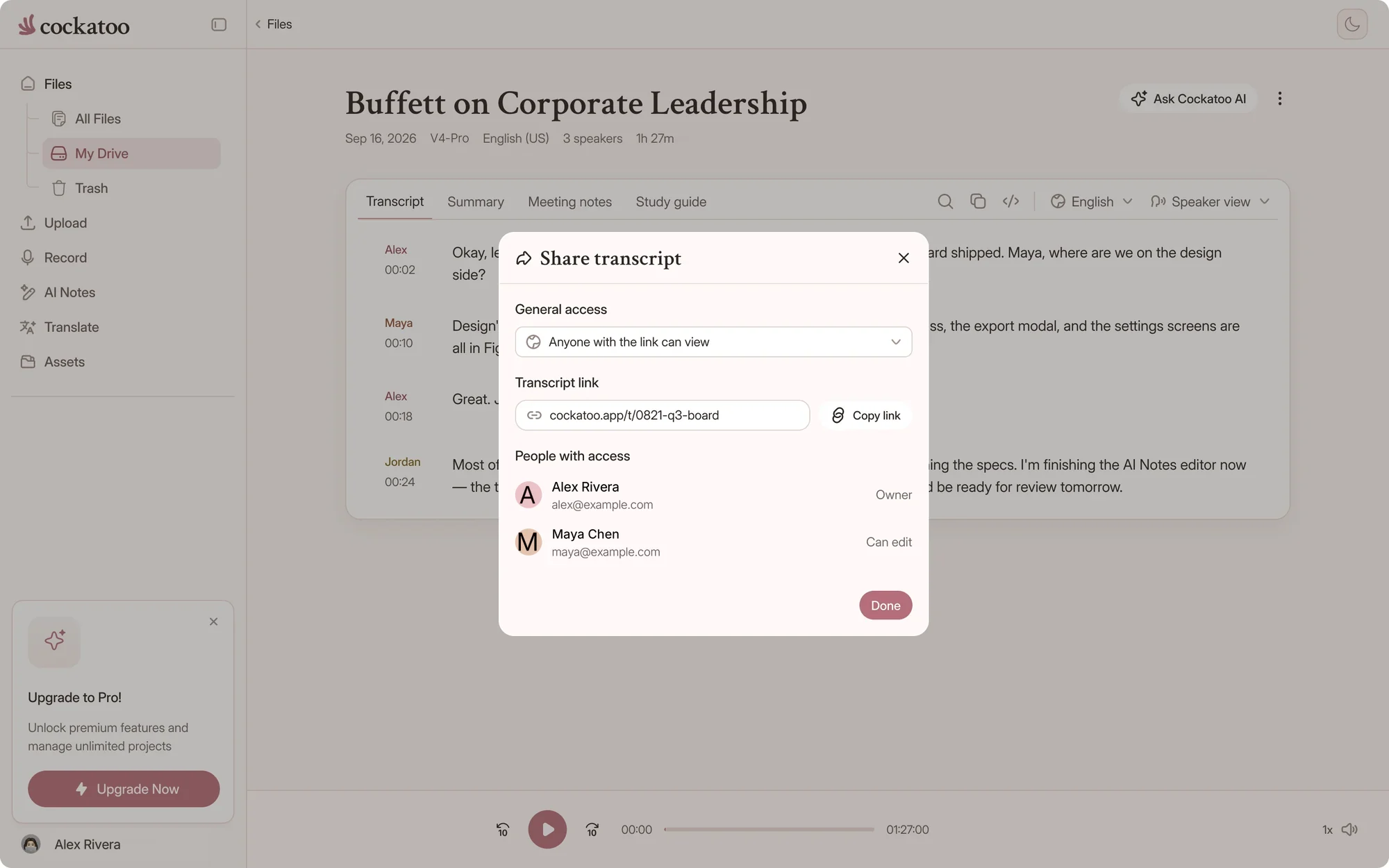
Sharing a Cockatoo transcript with a link

Loom Video Becomes Accessible, Searchable, and Captioned for Marketing

Turn your Loom recording into text that search engines can index, screen readers can parse, and viewers can search.

Add captions to your video for social media, documentation, or accessibility.

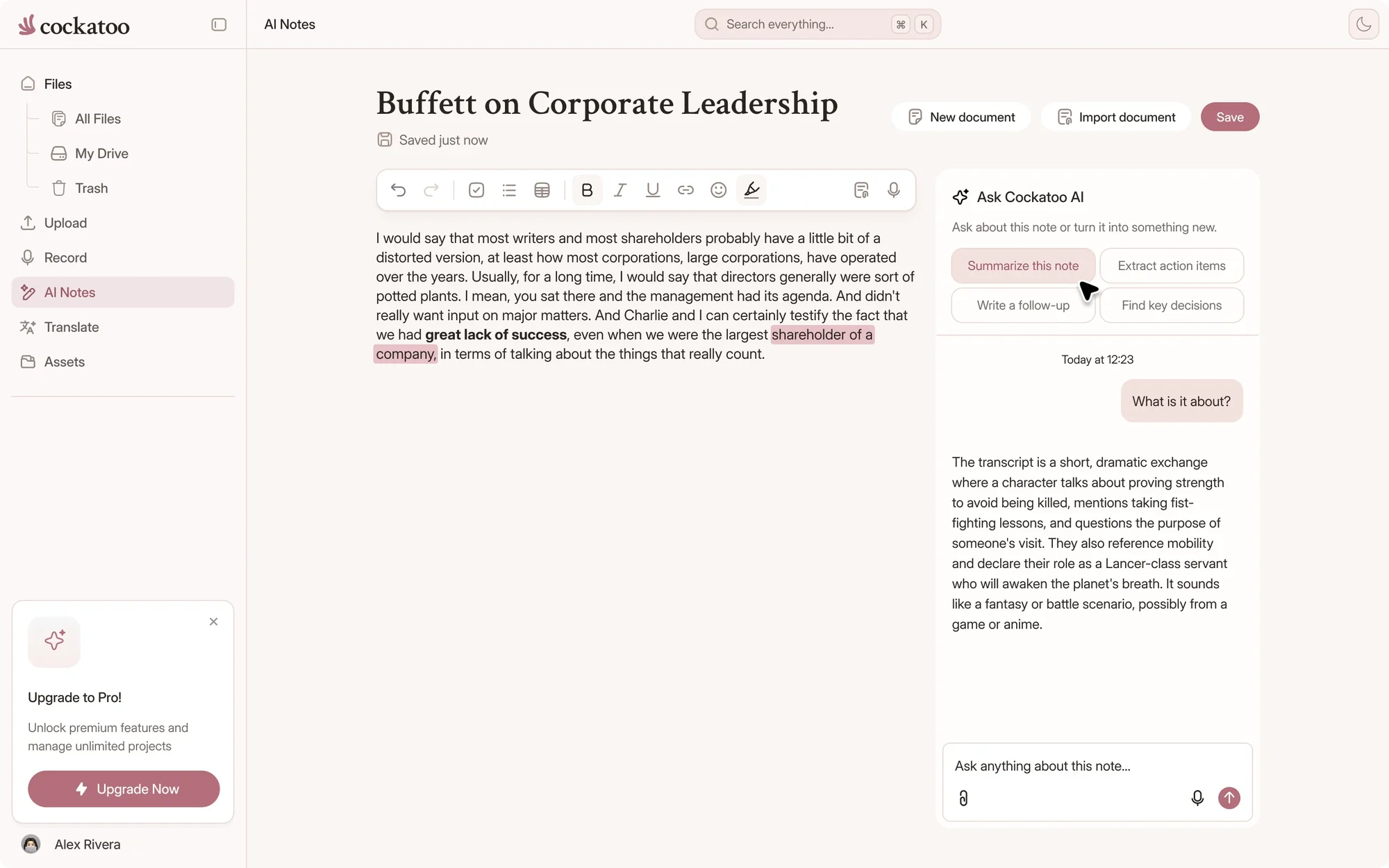
Cockatoo AI notes generated from a recording

Edit Loom Transcript In-Browser; One-Click AI Summary with Canvas

Make corrections, add notes, or reformat the transcript without leaving Cockatoo.

Click once to generate an AI summary, extract action items, or rewrite sections with Canvas, the built-in AI editor.

How it works

How to Transcribe a Loom Video in Three Steps

From Loom link to finished transcript in under a minute.

  1. Download the video from Loom

    Open the video in Loom and use its download option to save an MP4.

    Videos you own download in a click. For someone else's video, ask the owner for the file.

  2. youtube.com/watch?v=seminar-week-4Import
    • Your device
    • YouTube
    • Google Drive
    • Dropbox
    • iCloud
    • Public file link

    Drop the Loom Download In, or Paste a Public File Link and Go

    Drag the MP4 into Cockatoo, or paste a public link that points directly to the video file.

    Transcription starts immediately. The downloaded MP4 is the quickest way in.

  3. .docx.pdf.txt.srt.vtt.csv.json

    Free exports on every plan

    Export Subtitles and Captions Once the Transcript Is Ready

    After transcription completes, export subtitles in the format you need.

    Cockatoo handles video captioning and subtitle export, so you can add captions to your Loom video or share the file with your editing tool.

Exports and translation

When You Need a Loom Transcript

Audio Extracted Automatically, Captions Synced With Word-Level Timestamps

Video files have their audio extracted automatically, with no transcoding step, and the transcript can be exported as an SRT subtitle file alongside DOCX, PDF and TXT.

Captions appear synced because Cockatoo includes word-level timestamps in the export.

Translate Loom Transcript into Many Languages as PDF, DOCX, TXT

Take your English Loom transcript and translate it into Spanish, French, German, Japanese, or dozens of other languages. Free accounts get translation previews, and Pro translates whole transcripts.

Cockatoo also translates PDF, DOCX, PPTX, XLSX and TXT files between languages while keeping the document usable; scanned PDFs and photos are supported via OCR (formatting less precise). Translated PDFs come back as PDF, with an in-app preview before download.

Speed and accuracy

Fast Transcription with Accuracy You Can Trust

120xreal-time speed in V4-Flash, at most
~30 sfor a one-hour recording in V4-Flash
25 of 36languages where V4-Pro had the lowest error rate of the tested providers on FLEURS

Accuracy You Can Audit

Most transcription tools claim high accuracy but publish no proof.

Cockatoo publishes accuracy tests for 36 languages using the same public test set researchers use, plus real-world audio examples, and V4-Pro had the lowest error rate of the tested providers in 25 of 36 languages. Accuracy varies by language and recording quality.

Cockatoo V4-Pro on FLEURSError rate · lower is better
  • English3.9% WER
  • Spanish1.0% WER
  • German2.4% WER
  • French7.8% WER
  • Japanese6.5% CER

Accuracy varies by language and recording quality. Updated October 27, 2026. Full results and method

Blazing Speed: Transcripts Ready in Seconds, Not Minutes

Cockatoo transcribes at up to 120x real time in V4-Flash, its fastest mode.

Upload your Loom video and get a finished transcript in seconds, so you can move on to editing or translation without waiting.

Limits

No Monthly Hour Cap on Default Modes

V4-Flash, the default mode, is unlimited on every plan, including Free.

Free and paid usage limits for uploaded files, as of November 2026
FeatureCockatooOtterDescriptTurboScribe
Free planUnlimited full-length transcripts in V4-Flash, with no daily limit300 minutes a month, up to 30 minutes per conversation, and 3 file imports in total1 media hour a month, with a watermark on exports3 files a day, up to 30 minutes each
Paid plan limitsV4-Flash unlimited on every plan; V4-Pro allowance shown on the limits pagePro: 10 imports and 1,200 minutes a month10 media hours per editor a month on HobbyistUp to 10 hours or 5 GB per file
Built forLive recording in the web app and iOS app, plus uploads and linksLive meetings, through an AI agent that joins callsEditing video and podcasts by editing textUploaded files

Competitor details come from each company's own pricing page as of November 2026. Plans change, so check each site before you buy.

No Monthly Hour Cap on Default Modes

V4-Flash is engineered to be fast and efficient, so you can transcribe every Loom you record without counting hours.

Unlimited File Length on Pro, Bigger Allowances on Max

Pro supports unlimited file length and transcribes whole recordings in V4-Pro.

If you have a large archive or ongoing transcription needs, Max starts at $100 a month with 5x or 10x the Pro V4-Pro allowance.

Unlimited Default Modes; Usage Allowance for the Highest-Accuracy Mode

The default transcription mode, V4-Flash, has no monthly or weekly cap.

The highest-accuracy mode, V4-Pro, has a usage allowance on each plan, shown on the limits page, so you know exactly what you can use.

No Per-Hour Charges to Worry About

Cockatoo is self-serve from the first minute: upload, transcribe, export.

There are no per-hour charges and no surprise bills. Free costs nothing, and paid plans are a flat subscription; see the pricing page.

Proof

Trusted by Professionals Who Check Every Transcript

What Our Users Appreciate: Accuracy on Difficult Accents, Raw Speed, Ease of Use

Our users appreciate accuracy on challenging accents, transcription speed, and how simple the tool is to use.

These are the same priorities Cockatoo optimizes for in every release.

Cockatoo supportA person reads every message
  • Monday to Friday
  • US business hours
  • Typical reply in half a business day
Contact support

Fully Human Support, Mon-Fri, Typical Response Half a Business Day

Every support ticket is answered by a person, not a bot, Monday through Friday during US business hours.

Typical response time is half a business day.

United States European Union (Finland)

Where your files are stored and processed

Processing in the US and EU, Support Access Only with Your Permission, Data Removed on Deletion

Your Loom videos are stored and processed in the US and the EU (Finland).

Data is retained while your account is active and removed when you delete a file or close your account. Support engineers can access your files only with your explicit permission.

“This transcriber is incredibly accurate, and not bothered by all the different accents i present it with. Highly recommended.”
Ian A.AustraliaRead review
“It works fast and the quality and accuracy are spot on. Love the service!”
AlUnited StatesRead review
“Need to do very little editing to make transcripts perfect”
Mick S.AustraliaRead review
FAQ

Common Questions About Transcribing Loom Videos

Short answers about links, downloads, captions and accuracy.

Visit the help center

Cockatoo publishes accuracy tests for 36 languages using the same public benchmark researchers use, so you can verify the methodology before you subscribe. Accuracy varies by language and recording quality, so check the benchmarks for your language.

Turn your next Loom video into text

Get your full transcript free, with no daily limit. Add captions, a summary and a translation in seconds.

Start Transcribing Free