AI subtitle generator

Captions fast, with an AI Subtitle Generator that includes transcripts.

Drop in a video or paste a YouTube link and get captions timed to every word, back in seconds. Fix any line in the browser, then export SRT or VTT for Premiere, YouTube or your CMS. Full-length transcripts are free and unlimited in V4-Flash, with no credit card.

  • Unlimited free in V4-Flash
  • SRT and VTT on every plan
  • Word-level timing
  • 36 languages
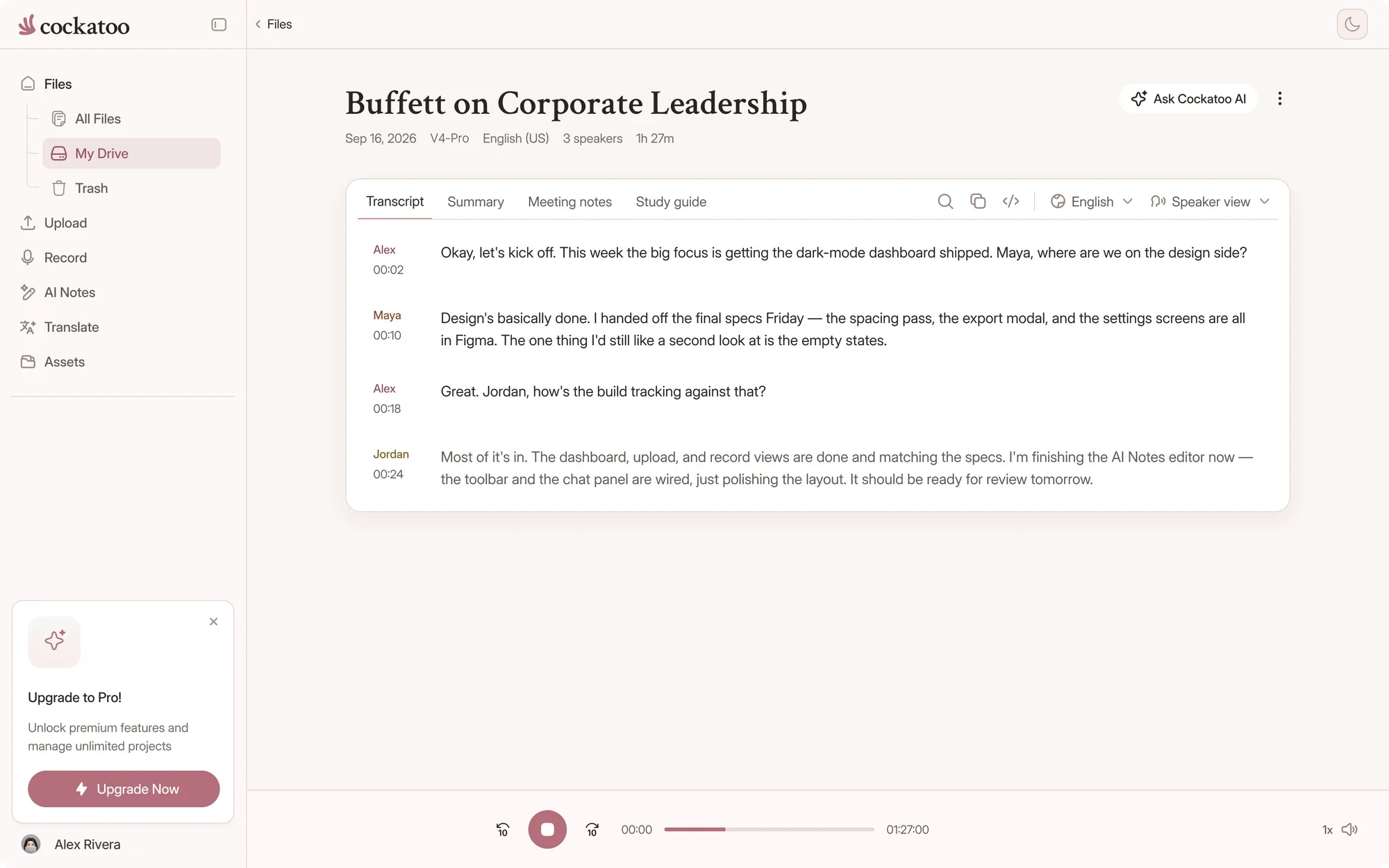
Cockatoo transcript following along as the recording plays
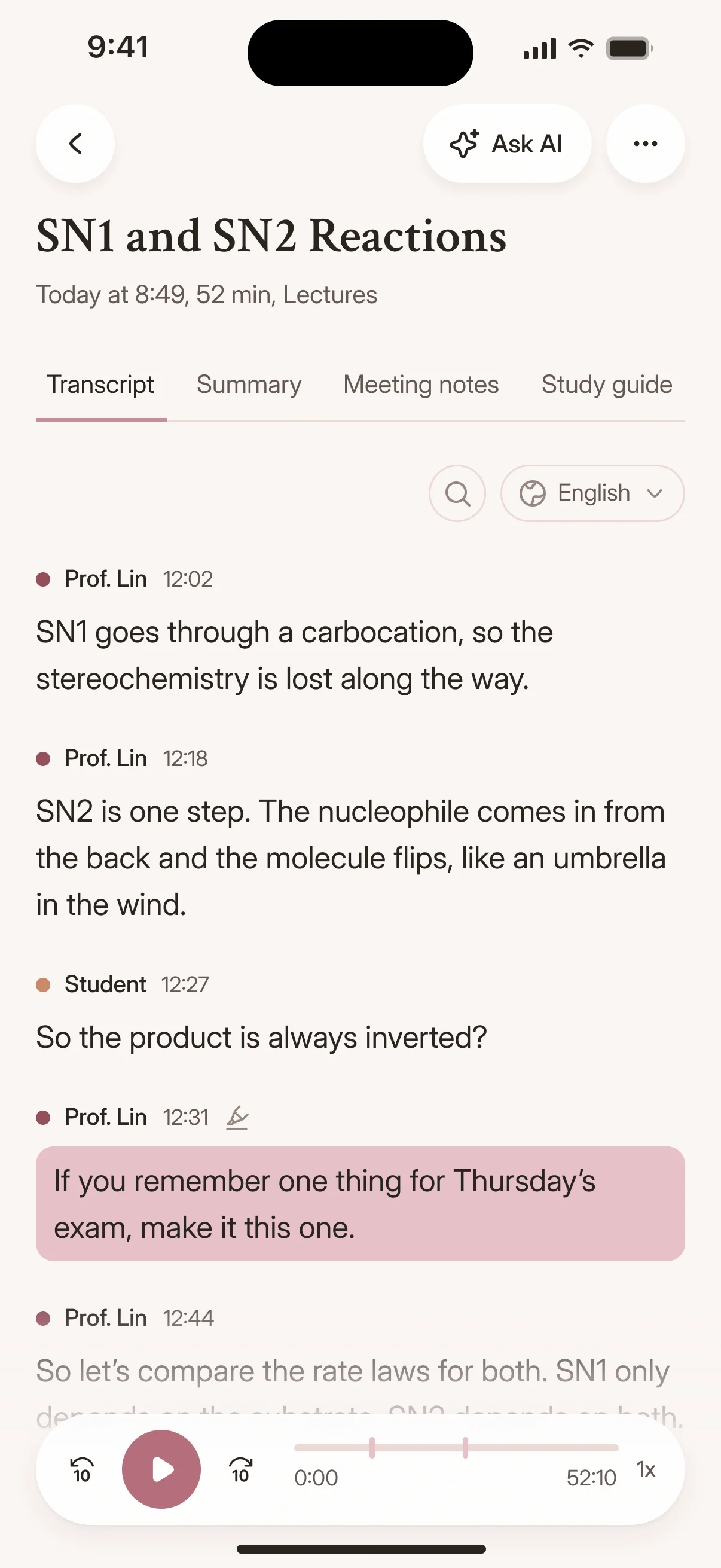
A transcript with timestamps in the Cockatoo iPhone app
Drag and drop
MP3MP4M4AMOVAACWAVOGGOPUSMPEGWMV
OR
Captions from any video

What Is an AI Subtitle Generator?

How Cockatoo Generates Subtitles from Video

An AI subtitle generator turns the audio from your video into timed text captions. Upload a video to Cockatoo, and the audio is extracted automatically. You get a transcript with word-level timestamps in seconds, speaker labels that identify every voice, and an SRT file ready for Premiere, DaVinci, YouTube, or your CMS.

The entire workflow runs in your browser with no transcoding step for you to manage. Upload a video, get caption-ready text synced to the spoken words, and import the SRT wherever you publish.

Why creators switch

Why Use Cockatoo for Video Subtitles

Four reasons creators and editors caption with Cockatoo.

Word-Level Timestamps for Accurate Sync

Cockatoo exports SRT files built from word-level timestamps, so every caption lines up with the words being spoken. Import the file into Premiere, DaVinci, or YouTube and the timing is already in place.

No manual adjustment, no guessing where a line starts. The transcript and the video stay synced from the first upload.

interview-03.m4a Renamed everywhere
04:02
Dr. Okafor

Let's start with the sampling. Why twelve schools?

04:09
Maya

We wanted rural and urban sites in every region.

04:17
Dr. Okafor

And the consent forms went out before the first visit?

Speaker-Labeled Subtitles That Update Everywhere

Rename a speaker once in the editor and every line they said updates automatically. Cockatoo's speaker recognition labels every voice, so you never have to guess who said what or fix labels line by line.

interview-03.m4a Saved
00:12
Interviewer

So how did Bourdieu shape the way you read the fieldwork?

00:19
Participant

His idea of habitus gave me a vocabulary for what I was seeing in the classroom.

In-Browser Transcript Editing Before Export

Cockatoo's in-browser editor lets you correct terms, adjust timing, and rename speakers before you export the SRT. The changes apply instantly, and the file stays in sync with your video.

Fix a technical term or a name once, export, and the subtitle file is ready to import. No round trips, no external tools.

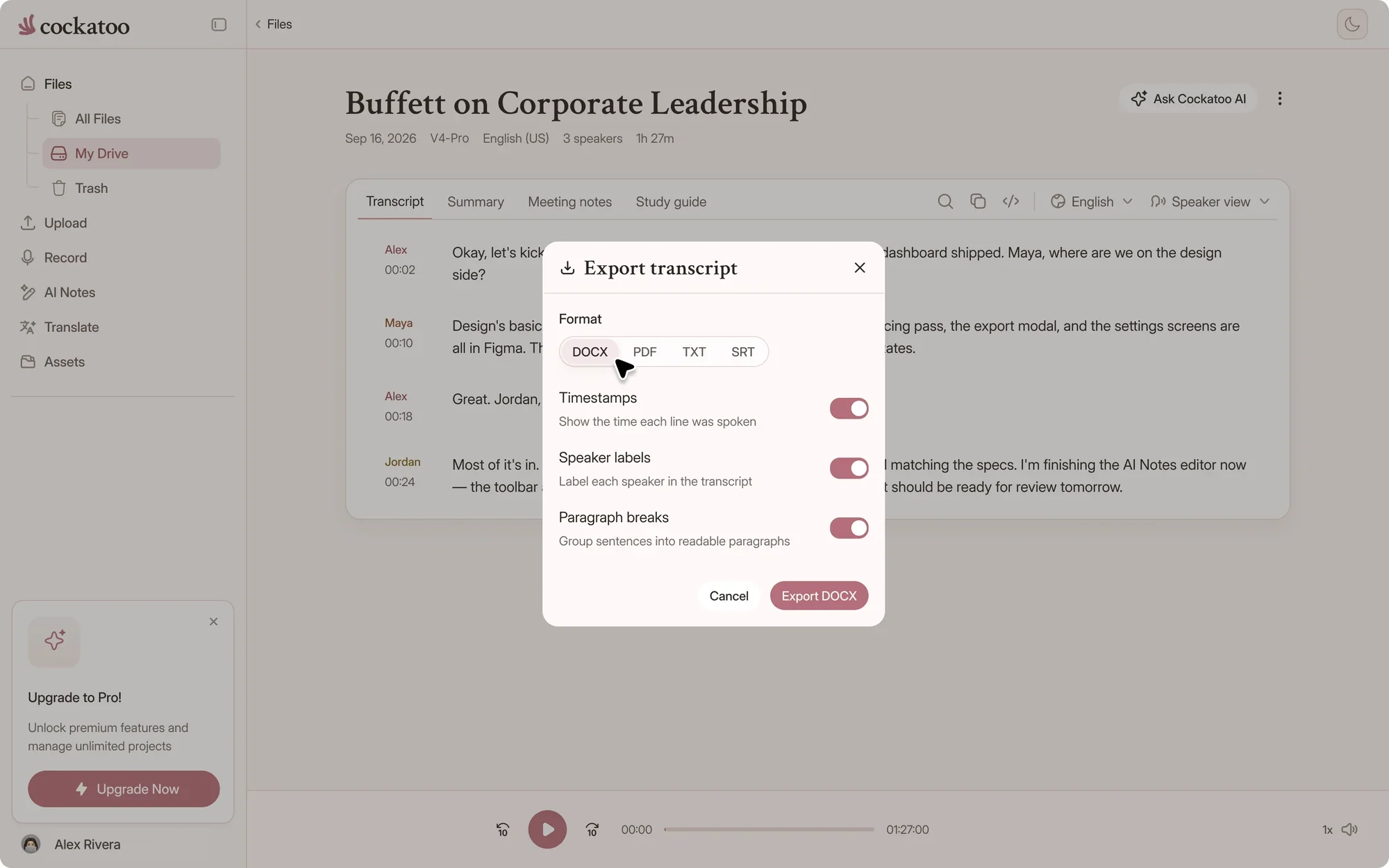
.docx.pdf.txt.srt.vtt.csv.json

Free exports on every plan

Export to the Tools You Already Use

Download your subtitle file as SRT or VTT and import it straight into Premiere, DaVinci Resolve, Final Cut, YouTube, or your CMS. Cockatoo also exports DOCX, PDF, and TXT with timestamps and speaker labels if you need a readable transcript instead of a subtitle file.

The format you need is already there. No conversion tools, no extra steps.

Captioned in four steps

How to Generate Subtitles with Cockatoo

  1. Step 1: Upload Your Video File

    Drag and drop your video into Cockatoo or paste a YouTube link. MP4, MOV, WEBM, AVI, and most other formats work without conversion.

    The audio is pulled out automatically, usually right in your browser, so there is no separate transcode for you to wait on. Multi-hour files are supported on Pro.

  2. Step 2: Cockatoo Transcribes and Labels Speakers

    Cockatoo transcribes the audio and identifies every speaker in V4-Pro. A one-hour video comes back in about 30 seconds in V4-Flash, with word-level timestamps and punctuation already applied.

  3. Detected languageالعربية
    • English
    • Español
    • العربية
    • 日本語
    • עברית
    • Deutsch
    • فارسی
    • Français
    • اردو

    00:14 مرحبًا بكم في المحاضرة الرابعة

    Step 3: Translate the Transcript If Needed

    Cockatoo handles document translation, so you can translate the transcript into another language before exporting subtitles. Upload the transcript as a document or translate it directly in the editor.

    One tool for both halves of the job: get the words out of the audio, then get them into another language.

  4. Step 4: Publish or Share Your Captioned Video

    Once the SRT is imported, your video has captions. Publish to YouTube, embed on your site, or deliver to a client.

    Cockatoo keeps the original video and transcript in your workspace, so you can export in a different format or share the transcript as a PDF later.

Every screen, every audience

Common Scenarios for Fast, Accurate Subtitles

Captioning Videos for Social Media

TikTok, Instagram Reels, and YouTube Shorts need captions to stop the scroll. Upload your video, get an SRT file with word-level timing, and burn the subtitles in or overlay them in your editor.

Cockatoo handles vertical video, horizontal video, and any aspect ratio.

Making Video Content Accessible

Accessibility compliance and inclusive design both require accurate captions. Cockatoo generates subtitles with speaker labels and timestamps, a starting point for meeting WCAG and platform accessibility standards once you've reviewed them.

Upload a training video, webinar recording, or course module and get a caption file ready to publish. The transcript is also exportable as a readable PDF for users who prefer text.

Publishing to YouTube with Captions

YouTube auto-captions are rough and often wrong. Upload your video to Cockatoo, download the SRT, and upload it to YouTube as a custom caption track.

You can check and fix the captions in the editor before they go live, so you spend less time fixing errors and more time publishing.

Delivering Client Work with Professional Subtitles

Clients expect captions that look polished and sync perfectly. Cockatoo delivers SRT files with word-level timestamps, so the captions you hand off are ready to import and publish.

Storing and Sharing Subtitle Files

Cockatoo keeps your videos, transcripts and source files in your account until you delete them. Generate captions, and come back to export the SRT again whenever you need it.

Share a transcript with clients or collaborators by link or invitation. Your caption library stays organized and reachable from any browser.

Every format, free

Export Formats for Subtitles and Transcripts

One upload, seven export formats, on every plan including Free: DOCX, PDF, TXT, SRT, VTT, CSV and JSON.

Cockatoo export menu with DOCX, PDF, TXT, SRT and more

SRT Files for Video Editing and Publishing

SRT is the standard subtitle format for Premiere, DaVinci Resolve, Final Cut, YouTube, and most video platforms.

Import the SRT into your editor and the captions appear on the timeline, ready to style or burn in. No manual timing adjustments, no line-by-line sync.

DOCX, PDF, and TXT for Readable Transcripts

If you need a transcript instead of a subtitle file, export as DOCX, PDF, or TXT. All three formats can include timestamps, speaker labels, and paragraph breaks.

The DOCX file opens in Word or Google Docs for editing. The PDF is ready to share or archive. The TXT file is plain text for pasting into other tools.

Click Any Word to Jump to the Audio

Cockatoo includes an in-browser transcript editor. Click any word to jump to that moment in the audio, fix errors inline, and adjust speaker labels before exporting.

The editor saves changes automatically. Once the transcript is clean, export it as SRT, DOCX, PDF, or TXT with all edits intact.

Bulk Export for Multi-Video Projects

Upload multiple videos at once and export all the subtitle files in one batch. Cockatoo handles up to 20 files per upload on Pro, so you can process an entire series or course module in one session.

Each video gets its own SRT file with word-level timestamps and speaker labels. Download them all as a zip and import them into your editor.

36 languages

Captions in Any Language

Caption in the language your audience speaks. Cockatoo detects it for you.

Transcribe and Caption in Your Language

Cockatoo generates subtitles in 36 languages. Upload a video in Spanish, Japanese, Arabic, German, or any supported language and get captions back with word-level timestamps.

In V4-Flash, language auto-detect runs before transcription, so you do not have to specify the language unless you want to override it. V4-Pro asks you to pick the language. The transcript and SRT file come back in the same language as the audio.

Mixed-Language Videos and Code-Switching

Videos that switch between languages mid-conversation are handled automatically.

Code-switching is common in multilingual teams, international calls, and bilingual content. Cockatoo handles it without requiring separate uploads or manual language tagging.

Detected languageالعربية
  • English
  • Español
  • العربية
  • 日本語
  • עברית
  • Deutsch
  • فارسی
  • Français
  • اردو

00:14 مرحبًا بكم في المحاضرة الرابعة

Right-to-Left Scripts: Arabic, Hebrew, Persian, Urdu

Arabic, Hebrew, Persian, and Urdu display right-to-left in the Cockatoo editor. The SRT file keeps the original script, so captions read right-to-left in editors and players that support RTL text.

Upload a video in Arabic, get an SRT file with word-level timestamps, and import it into Premiere or YouTube.

youtube.com/watch?v=seminar-week-4Import
  • Your device
  • YouTube
  • Google Drive
  • Dropbox
  • iCloud
  • Public file link

Importing Videos from Links

Paste a link to a video hosted on YouTube or Vimeo, or a public link to a video file, and Cockatoo imports it directly. No need to download the file first.

The video is transcribed and captioned in the original language. Export the SRT file and upload it back to the platform as a custom caption track.

Seconds, not hours

Fast, Accurate Subtitles Every Time

120xreal-time speed in V4-Flash, at most
~30 sfor a one-hour video in V4-Flash
36languages with published accuracy tests

One-Hour Video Transcribed in 30 Seconds

Cockatoo transcribes at up to 120x real-time in its fastest mode. Upload a one-hour video and get a finished transcript with word-level timestamps in about 30 seconds.

Manual transcription of the same video takes most of a working day. Cockatoo delivers the same result before you step away from your desk.

Cockatoo V4-Pro on FLEURSError rate · lower is better
  • English3.9% WER
  • Spanish1.0% WER
  • German2.4% WER
  • French7.8% WER
  • Japanese6.5% CER

Accuracy varies by language and recording quality. Updated October 27, 2026. Full results and method

Published Accuracy Tests for 36 Languages

Cockatoo publishes per-language accuracy tests for 36 individual languages, run on the same public benchmark researchers use to compare transcription engines, plus real-world recordings with background noise and accents.

The methodology and audio examples are public and auditable on the benchmarks page. Accuracy varies by language and recording quality.

Handles Accents, Crosstalk, and Ambient Noise

The hard parts of transcription are accents, overlapping speech, and background noise. Cockatoo is tested on real-world audio with strong accents, crosstalk, and ambient noise, not only clean studio recordings, and the editor makes the remaining fixes quick.

“This transcriber is incredibly accurate, and not bothered by all the different accents i present it with. Highly recommended.”
Ian A.AustraliaRead review
“Quick and very precise transcription. Since I transcribe a lot (podcasts, videos) I am very happy with the pricing package, too.”
LaraAustriaRead review
“Simple to use, very accurate - can identify between speakers and quicker than most in identifying franco arabic conversation.”
Dina S.CanadaRead review
FAQ

Subtitle and caption generator questions answered

Quick answers about subtitle files, speakers and plans.

Visit the help center

Yes. Upload video or audio and Cockatoo will turn it into a polished transcript with timestamps, paragraphs, and export options, including SRT and VTT subtitle files.

Generate your first subtitle file

Get your full transcript free, with no daily limit and no credit card. Export SRT or VTT captions in seconds.

Start Transcribing Free